[Product Infomation]
Brand : AVerMedia
Materials : Plastic, Metal
[Product Description]
・Supports 4K pass-through
・Supports high-quality recording at 1080p/60fps
・Two recording modes to suit your needs
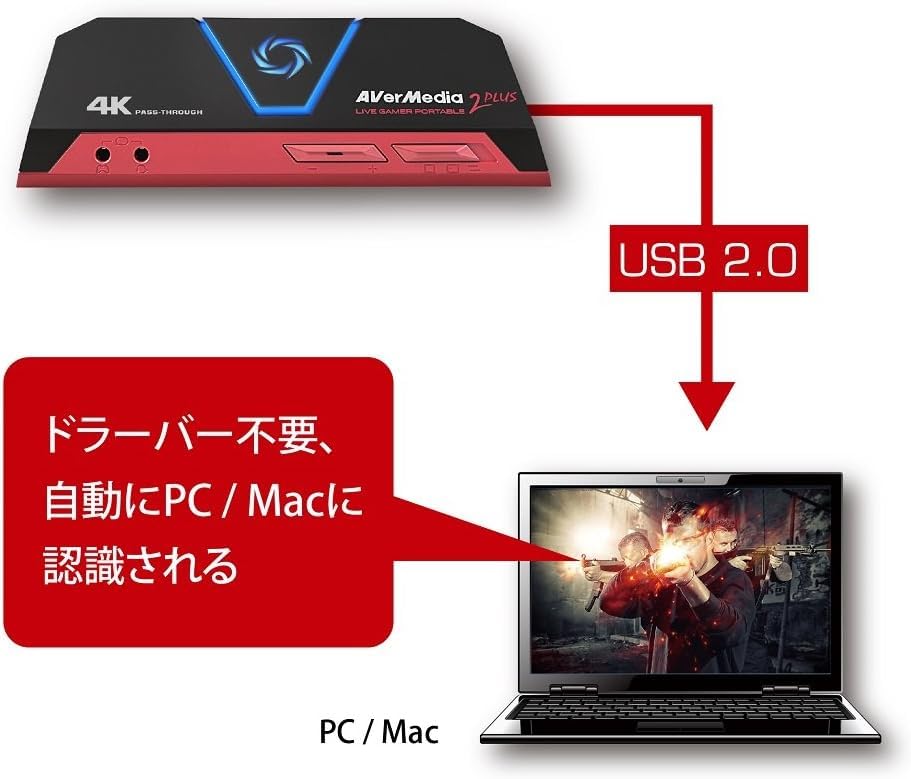
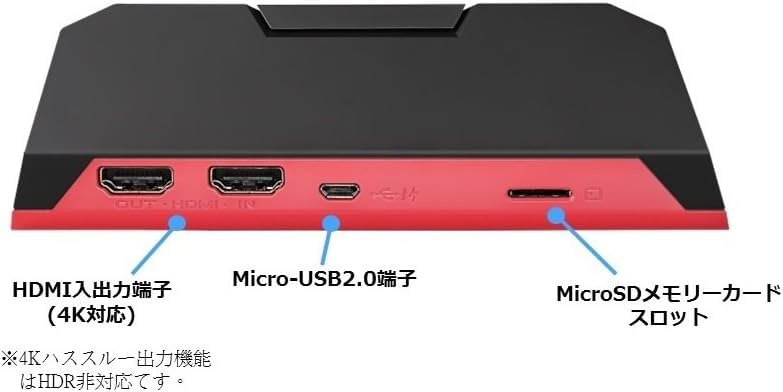
・Equipped with HDMI input/output and a headset connection terminal, no dedicated driver installation required
[Game Capture]
Supports 4K pass-through and high-quality recording at 1080p/60fps. This HDMI game capture device can also be powered by a mobile battery.
■ Two recording modes to suit your needs
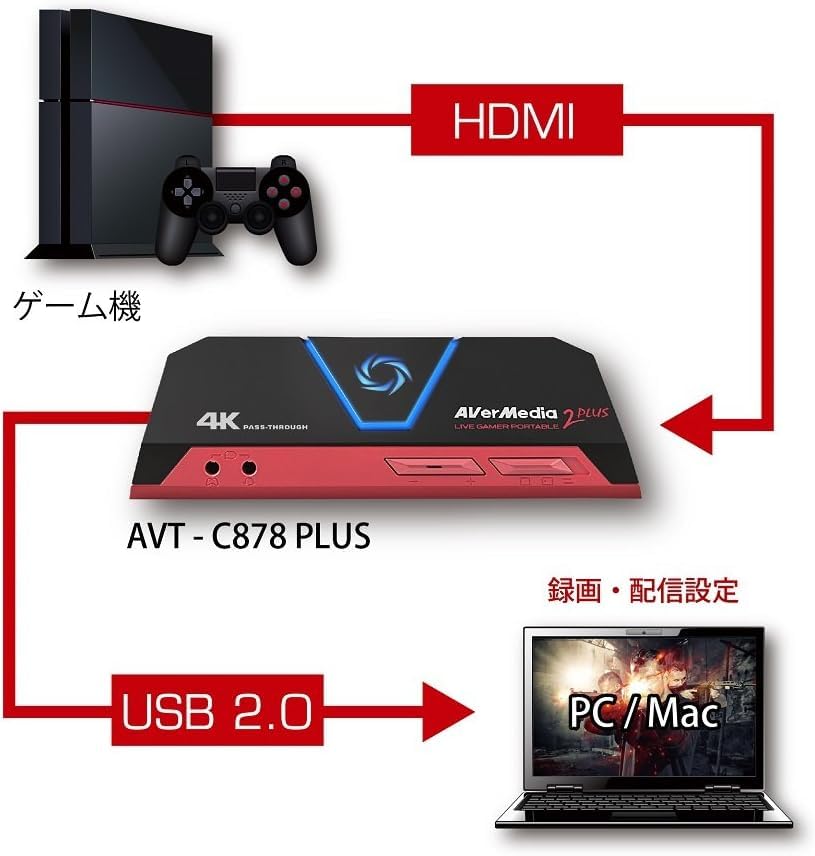
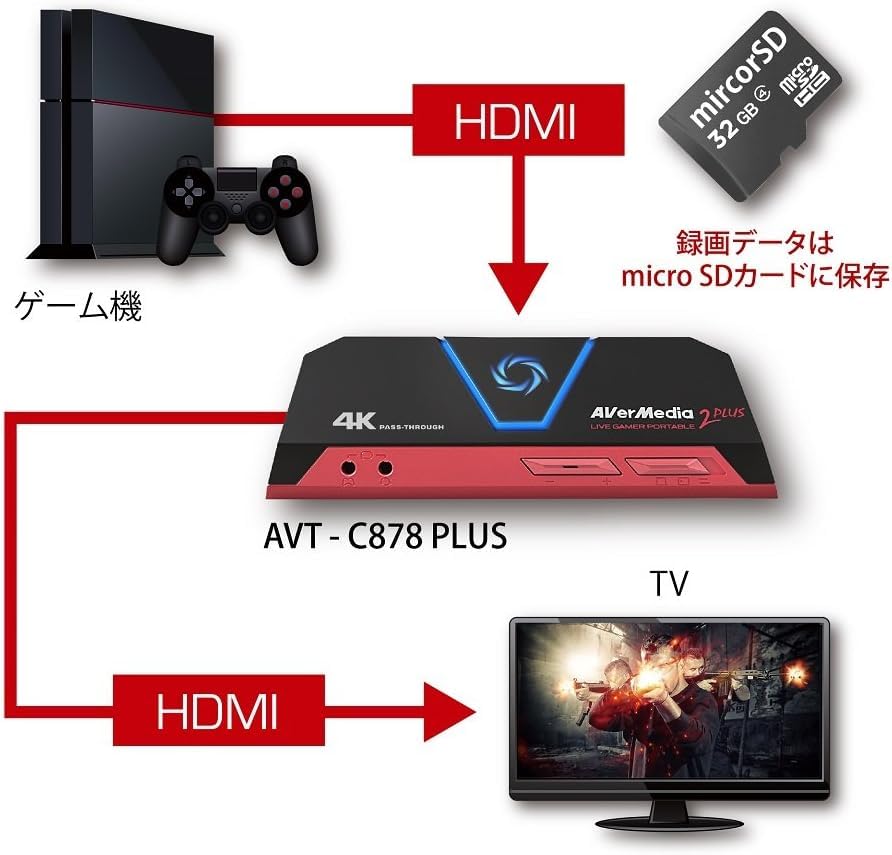
Equipped with HDMI input/output terminals, it allows you to record and livestream gameplay videos from game consoles and devices with HDMI output. Choose from two modes: "PC Mode" and "Standalone Recording Mode" depending on your gaming environment. Both modes provide high-quality recording at 1080p/60fps.
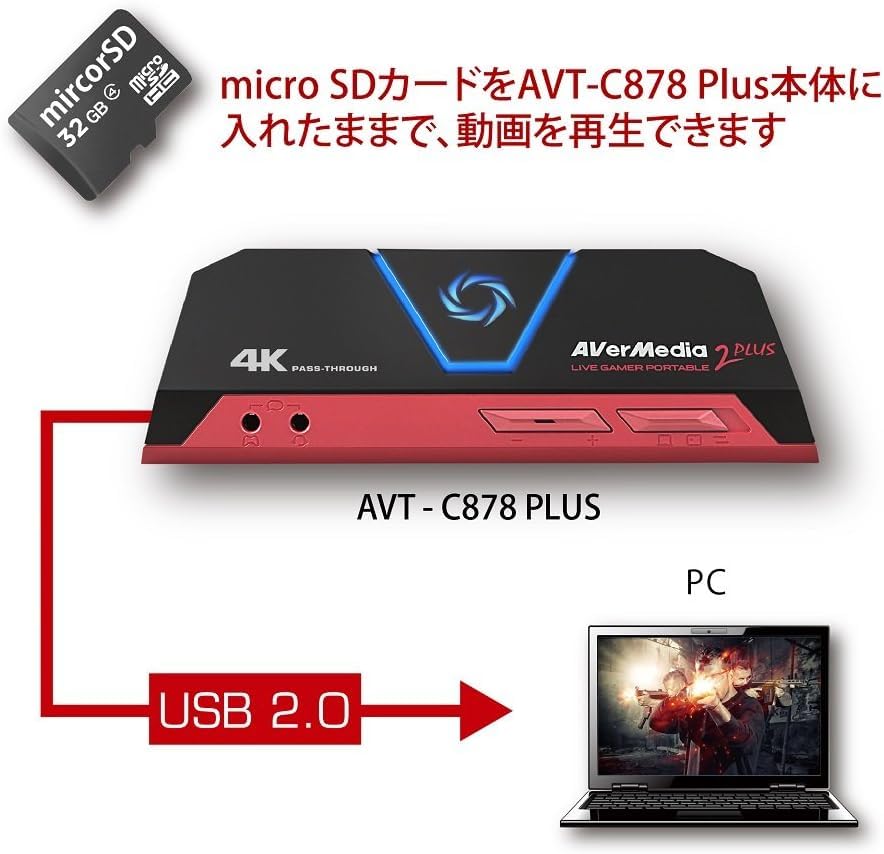
In "PC Mode," you can record and livestream gameplay on your PC without installing a dedicated driver. In "Standalone Recording Mode," no PC is required; simply press the START button in the center of the unit to begin recording. Recorded files are saved to a microSD card (sold separately). Additionally, using "Card Reader Mode" allows you to transfer files stored on a microSD card to a PC and play videos from the microSD card on a PC.
* HDCP (copyright protection technology that prevents unauthorized copying) restrictions may prevent video display, recording, and streaming.
* When connecting a PlayStation 3, Android smartphone/tablet, or video device (such as a Blu-ray/DVD player), content output via HDMI is protected by HDCP, preventing video display, recording, and streaming.
■ Supports 4K Pass-Through Function
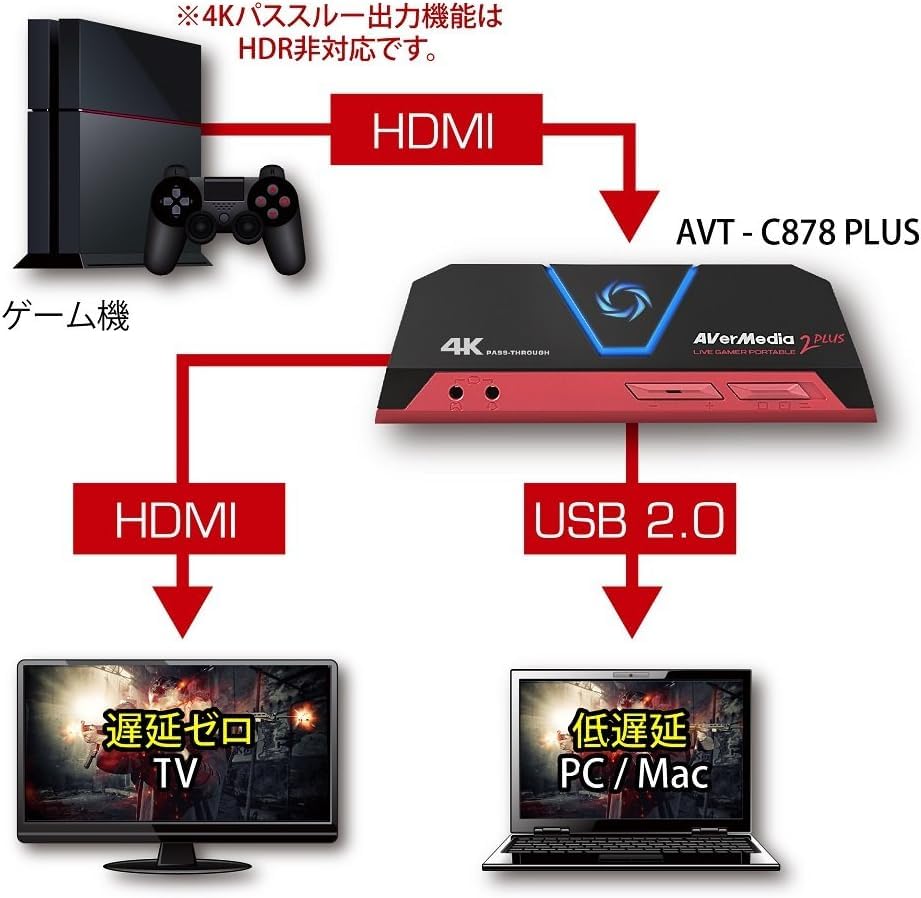
By connecting to a 4K output-compatible game console such as a PlayStation 4 Pro or Xbox One X, you can play on a 4K screen and simultaneously stream and record.
* The 4K pass-through output function does not support HDR.
■ Includes Dedicated Capture Software "RECentral"
The latest version of our streaming and recording software, "RECentral 4," is included. In addition to "Single Mode," it supports "Multi Mode," which allows multiple devices to be placed on top of one another on a single screen. Simple setup allows for customization of the recording and streaming screen. It supports various video streaming services, including Niconico Live Broadcasting, Twitch, YouTube, and Facebook. Simply register an account for each compatible streaming service and you'll be able to enjoy live streaming right away. You can also create your own layout and stream using a variety of features, such as picture-in-picture (PiP), chromakey compositing, and live editing.
■ Record live commentary simultaneously with video
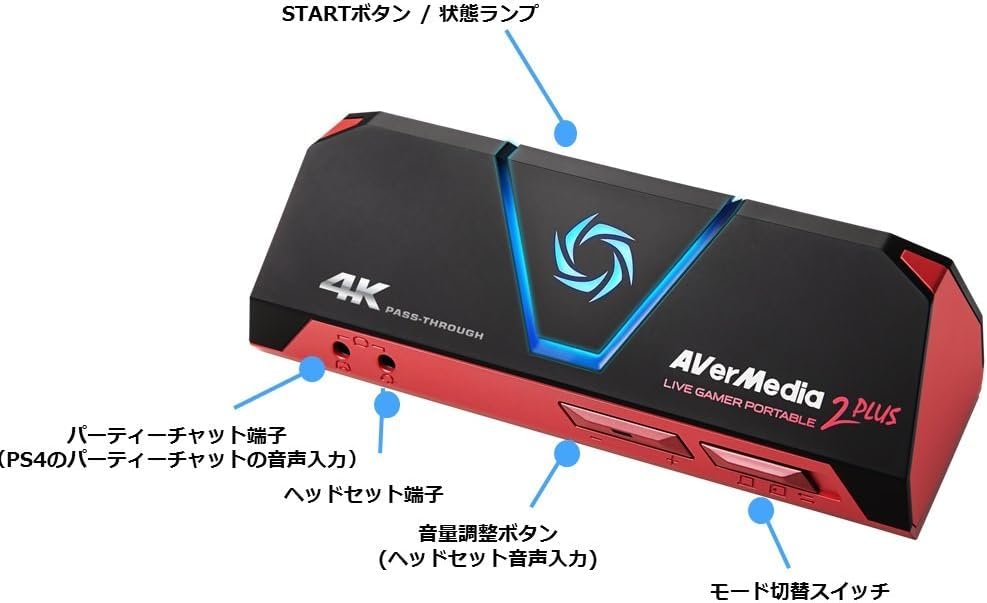
The built-in headset jack allows you to record live commentary simultaneously with video. When recording gameplay on PS4 or Xbox One, you can also include your friends' voice chat (party chat) in your video.
* Support may vary depending on the specifications of your headset/earphones/microphone.
* Earphones included with iPhones/iPods are not supported.
■ Powered by a mobile battery
By using an HDMI conversion adapter (sold separately), you can capture game apps on iOS devices (iPhone/iPad/iPod touch). When recording in standalone mode, you can power the device with a mobile battery and take it with you, allowing you to record smartphone games anytime, anywhere.
* A genuine Apple Digital AV Adapter (HDMI conversion adapter) is required to connect to an iOS device, sold separately.
* Recording from Android smartphones and tablets is not supported.
* If using a USB adapter or mobile battery, we recommend using a 5V/1A product.
Inputs: 1 x HDMI 2.0, 1 x 4-pole headset jack, 1 x 4-pole party chat jack
Outputs: 1 x HDMI 2.0 (supports 4K pass-through), 1 x 4-pole headset jack
Supported Storage: microSDXC/SDHC card (Class 10 or higher recommended)
Interface: USB 2.0
Recording Format: PC mode: MP4, Standalone recording mode: MOV
Maximum Recording Resolution: 1080p/60fps
Still Image Capture Format: JPG
Power: 5V/1A (powered by USB or mobile battery)
Dimensions: 147(W) x 47(H) x 57(D) mm
Weight: Approximately 185.5g
Supported OS: Windows 10, Mac OS X 10.11 or later
Accessories: HDMI cable, USB 2.0 cable, 3.5mm stereo audio cable (4-pole), Quick Guide
[Important Notes - For International Customers]
Thank you for purchasing this product. Please read the following important notes carefully before using this product overseas.
1. Legal and Safety Standards
This product complies with Japanese safety standards. Before using this product in your country, please verify compliance with local legal and safety standards.
Certain product categories (electronic devices, cosmetics, food, etc.) may require importing country certification.
2. Regarding Electrical Products
[Voltage Compatibility]
When using electrical appliances, please note that they are designed for Japanese voltage specifications (90-110V). Using them with a different voltage may cause malfunction.
[Plug Type]
Our products use Japanese plug types (Type A or Type B).
Please use a conversion adapter if necessary.
[Important Notes Regarding Transformers and Adapters]
A transformer adjusts the voltage to match the device's requirements.
A conversion adapter only modifies the plug shape; it does not adjust the voltage.
Using a conversion adapter without a transformer may damage the product.
[Liability]
We are not responsible for any malfunctions or damage caused by improper use, such as operating the product without a transformer.
3. Language and Manual
Product instructions and labels may only be in Japanese.
You can download the English manual from our website.
4. Product Returns and Exchanges
Please note that if you wish to return or exchange a product, you must submit a video of the product being unpacked.



 No-delivery refund

![AVerMedia HDMI Usb Live Gamer Portable 2 PLUS AVT-C878 PLUS [4K Pass-through Compatible Capture Device for Game Recording and Live Distribution]](https://img.joomcdn.net/acc6fb0cb817a18851a8f142d31c5e7c814653c7_100_59.jpeg)
![Refurbished AVerMedia HDMI USB Live Gamer Portable 2 PLUS AVT-C878 PLUS [4K Pass-Through Capture Device for Game Recording and Live Streaming] DV478 C](https://img.joomcdn.net/1ad68d6d51f9876aece86629804f0cb74ee821dc_100_58.jpeg)




![AVERMEDIA AVerMedia Live Gamer 4K GC573 [4K Pass-Through PCIe Connection Game Capture Card] DV490](https://img.joomcdn.net/30da65ecb23f14dbab0d3fa32cd40b996ca1ae69_100_100.jpeg)